As of 2025-03-22, I’ve moved to Arch Linux as to my day-to-day operating system. That was my 4th attempt so far, but I’m taking it seriously from this moment. In this post I break down what I picked from the realm so far and which programs I’d recommend to a Linux newcomer if he had to start from scratch.
Exploration
Paradoxically, my main issue with switching to arch was its simpleness. To reach somewhat similar level of comfort as I had on Windows and to surpass it, I had to learn and filter out countless programs (I’m still kind of in a process). Good thing is that Windows has become so bloated and unusable that even bare TTY started to seem a better solution.
Arch by the way is a big FOSS1 project, and with that come all the mass collaboration benefits of big FOSS projects: forums, wikis, open docs, community of enthusiasts, etc.
The official website is featuring very based and abundant wiki where you can find pretty much anything from “how to install arch” to “RAID set up”.
Not gonna lie, it accidentally happens that some package gets broken, making the way out very unclear. Usually, 5-10 minutes on the web are enough to fix everything and get some additional knowledge about the system in the meanwhile. Though it is generally a good idea to not overbloat the system with poorly maintained packages and dependencies (packages from official repositories are often more than enough for any use case).
Threats: what’s wring with Windows/MacOS
The main problem with today’s “normie operating systems” is that no one except their devs knows exactly what code the OS is running. That means one has no choice but to trust Microsoft & Apple & Google & Yandex & Chinese Communist Party that spooky processes don’t have backdoors, hidden parts and are not being used to spy on them. I personally don’t mind if any data from my camera roll gets compromised, but there are things I prefer to stay private or cannot afford losing (i.e. civil documents, keys to my crypto wallets, PGP master key). Therefore, data leakage is considered a threat. It may come true due to user error (I won’t talk about that one seriously) or due to targeted attacks. A general solution would be to use some Linux or BSD distro that is open source (which is ez to say, but hard to actually implement). Although it does not fully mitigate the risk, I would rather rely on transparent projects’ reputations than on ones of Big Tech corps.
Apart from having a suspicious operating system, every modern PC has various management modules physically attached to the motherboard as well as some BIOS/UEFI firmware installed there by default. These modules are constantly listening to external commands as long as the battery is attached. Not to mention, they run proprietary code (that we can only guess upon) which makes it technically possible that the data is compromised even when you use a FOSS operating system. People usually overcome this threat completely by corebooting their PCs so that none of proprietary firmware can possibly run.
Apart from malware, there are some more attack vectors:
- physical tampering evil maid attack - when an attacker, having physical access to the PC, modifies some system components (alters EFI partition, mounts a keylogger, swaps the entire hardware) with the sole purpose of touching a passcode and later applying it to the encrypted disk. if the disk is unencrypted, it is trivial to read/copy the contents. Be aware, don’t make H. Biden’s mistakes
- compromised channel with malicious listeners (non-network MITM: power analysis, optical, acoustic, thermal, etc) - uncommon, very hard to implement, yet powerful way to sniff someone’s keys. If you find yourself wiretapped with such precision - my condolencies...
I’m not planning to disassemble my laptop and verify every component with magnifier and tweezer in the nearest future, however I’ve performed some but not all safety actions to make my data secure from a stranger’s eye. Once again, it is not about the fact that the data is compromised, it is about the risk of undetected leakage that I refuse to accept.
It’s easy to blame some hacker who sits in his room and finds a way to pull your data, but it’s statistically not a fraud who ends up with an empty crypto wallet.
What to choose
It’s important to agree on some axiomatics before diving into specifications: there are several principles and use cases I’m biased towards...
- See, I’m running my arch instance on a laptop, which means I am (and want to be) free to change locations and connect to external monitors effortlessly. Sometimes I like to HDMI my way into a living room TV screen. It’s very convenient since I can move with a wireless keyboard that acts just like a TV remote - but much more universal. Given that, I need some GUI2 that is completely operable without a mouse.
I’m not advising to dispose the mouse and become one with your keyboard, but I prefer this functionality and believe so shall anyone.
- Speed is always prioritized over aesthetics. All them fancy transitions, shadows, 1600X Dual-Kawase blurs that eat all of RAM+SWAP just postpone the appearance of truly useful information. Each pixel on a screen should be utilized smartly: nothing should distract from or delay the functionality. Time saved can be spent touching grass or iifting weights, at discretion.
The computer was made for man, and not man for the computer.
What I picked from the realm so far
On bare linux installation user gets a TTY on top of which he can install any program he prefers. The system doesn’t yet know whether it’s going to be used as some remote server or as a personal PC. If latter - some additional packages need to be installed to handle built-in display, sound card, etc. There are several fundamental choises out there: either to install a full Display Environment3 or to assemble it from pieces.
The main piece is a “display manager”. It’s a program that declares topology of windows and arranges them on monitors. Some DMs are window-based (they essentially imitate Win11/MacOS-like behaviour where each “app” is given a window that can be dragged/resized/minimized across the monitor). Another way to manage windows is to use “tiling” effect - always capturing the entire monitor space, splitting the monitor in half if there are two active windows, splitting in three if there are three and so on. Tiling DMs are what I chose from. I’ve tried ‘I3’, ‘BSPWM’ (they run on elder and less secure (but still well-written) X display server4), then I switched to Wayland DS, used ‘Hyprland’ for a while and swapped it to sway that I’m currently enjoying. It’s simple and resource-friendly.
So now I have...
| LVM on LUKS -encrypted NVMe SSD partition | |
|---|---|
| OS | Arch Linux |
| bootloader | GRUB |
| display manager | ly |
| window manager | sway on wayland |
| bar | i3blocks |
| shell | bash |
| terminal | alacritty |
| file manager | lf |
| app launcher | tofi |
| editor | nvim by nvchad |
I don’t use a DE (desktop environment) cuz it stands away from simple .dotfiles5 philosophy that Linux is famous for, plus I’m catching some cringy Windows Registry vibes with dconf database .
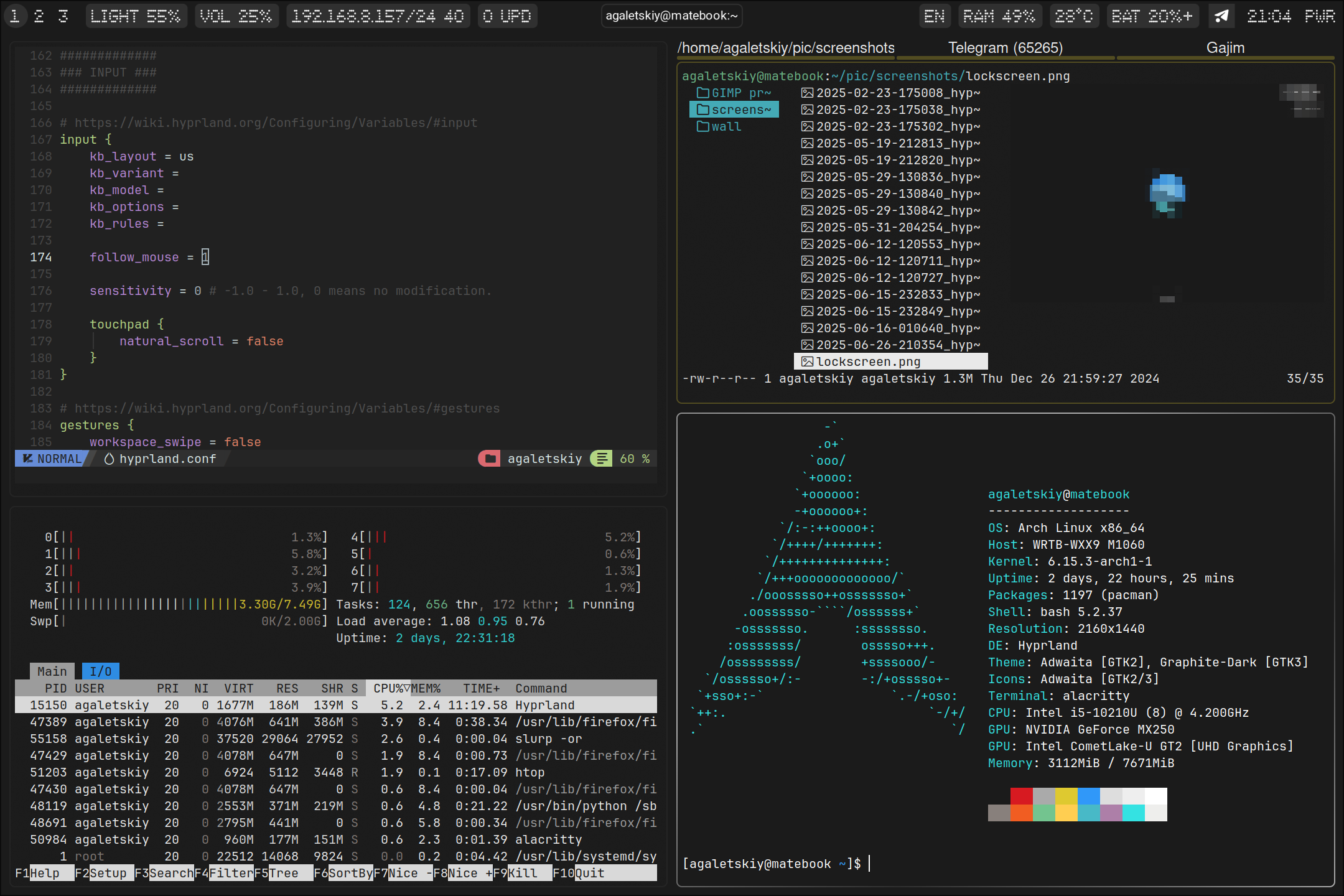
The theme is custom and pretty basic. Once I get everything ordered and polished here, I may publish my dotfiles. If you need anything specific - feel free to DM me.
ToDo
- Enroll my passkey device to LUKS volume
- Encrypt boot partition to counter evil maid - it will slow down boot process a lot, I’m not quite sure I want that rn
- Secure boot
- Try plain dm-crypt (detached LUKS header) - to make the thing indistinguishable from a disk filled with random data. Deniable encryption y’know...
Footnotes
Free and Open Source Software - software that has been made public. It still comes with a license that grants or doesn’t grant a right to modify/share/monetize the code. Licensing is essential cuz if the software does not come with a license, it can quickly obtain one by a first person to notice it and claim the ownership. I’m intentionally oversimplifying the process, but you get the idea. ↩︎
Graphical User Interface: provides user with an intuitive way to percieve apps via windows, navigate with cursor. CLI (Command-line Interface) is in a way simpler and much faster way to interact with the system. ↩︎
Is the easiest way to get basic functionality in one command.DE comes with a bundle of programs: window manager, status bar, browser, settings utility, notification daemon, etc. Some popular DEs like GNOME or KDE are well maintained, but it all comes with tradeoffs: lots of unnecessary packages, over-sophisticated UI, shady permission policies - that’s what comes to mind. ↩︎
One of the biggest things to choose is a display server - program that manages graphical input/output for other applications. It allows user to use graphical interface (GUI) by rendering windows, layers, mouse pointer properties and so on. Two popular options to choose from are
XorgandWayland. Wayland is more secure and modern, which makes it faster to handle similar graphic tasks on latest GPUs. ↩︎Dotfiles usually stand for files in
~/.configand~/.localdirectories. They’re meant to store user-specific configuration parameters and to be synchronized between various hosts. ↩︎